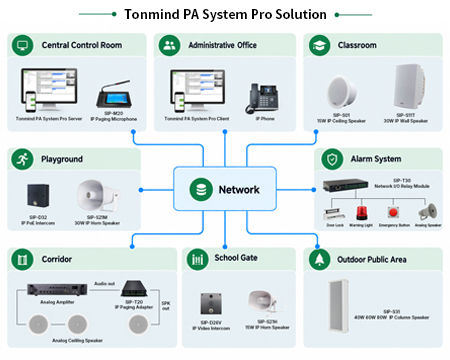
Tonmind PA System Pro Solution
Tonmind PA System Pro Solution All-in-One IP Audio Management Software for Modern PA Systems 1. Solution Overview Tonmind PA System Pro is an IP audio management platform with a built-in SIP Server. Based on a Server & Client architecture, it enables centralized management and multi-user operation across IP public address and intercom networks. The software can create up to 1,000 sessions/zones and flexibly assign SIP devices such as IP Speakers, IP Intercoms, IP Paging Microphones, IP Paging Adapters and IP Phones. It also supports ONVIF video integration, multiple audio sources, recording, mobile control and SIP Trunk integration, providing a unified solution for schools, commercial buildings, transportation, hotels, healthcare and security applications. Key Capability Description Architecture Server & Client architecture with centralized management and multiple client access Zone Capacity Up to 1,000 sessions/zones Device Capacity Up to 1,000 total registered devices, including SIP and video devices Built-in SIP Server SIP endpoints can register directly to PA System Pro Video Up to 1,000 video devices can be added; up to 16 video channels can be viewed simultaneously Audio Sources PC speaker audio, PC microphone, TTS, Live Radio, RTP Multicast and local playlists Recording Scheduled recording, keyword-triggered recording and sound-effect-triggered recording Mobile Control PA Connect via local Wi-Fi/LAN or P2P connection over 4G/5G Scalability The total number of registered SIP devices and video devices combined must remain within 1,000. PA System Pro can also create up to 1,000 sessions/zones. 2. Core Functions 2.1 Session & Zone Management PA System Pro uses sessions as flexible broadcast zones. Administrators can create and name sessions, assign SIP devices to each session, and configure the audio source, schedule and SIP Trunk associated with that session. Up to 1,000 sessions/zones can be created. ● Create and name sessions/zones based on building, floor, department or application needs. ● Freely add or remove registered SIP devices from each session. ● Assign different audio sources to different sessions. ● Configure broadcast schedules and SIP Trunk settings per session. ● Control multiple zones from one centralized interface. 2.2 Audio Sources PA System Pro supports multiple audio input methods, allowing users to choose the most suitable source for live paging, music, announcements and scheduled broadcasting. ● PC Speaker: captures audio played by the computer, allowing audio from music or media applications to be broadcast through the PA system. ● PC Microphone: uses the computer microphone as a live audio input source. ● TTS (Text-to-Speech): converts entered text into synthesized voice for broadcast. ● Live Radio: plays an online radio stream by entering the corresponding Live Radio URL. ● RTP Multicast: supports multicast audio distribution across compatible network endpoints. ● Playlist: uploads local audio files to pl...